Professional Sound Effects
for Live Performance

FX Live 3 is the go-to app for theatre sound designers and operators. Design cues, layer effects, and run your show — all from your iPad or Mac.

iPad Mac SwiftUI
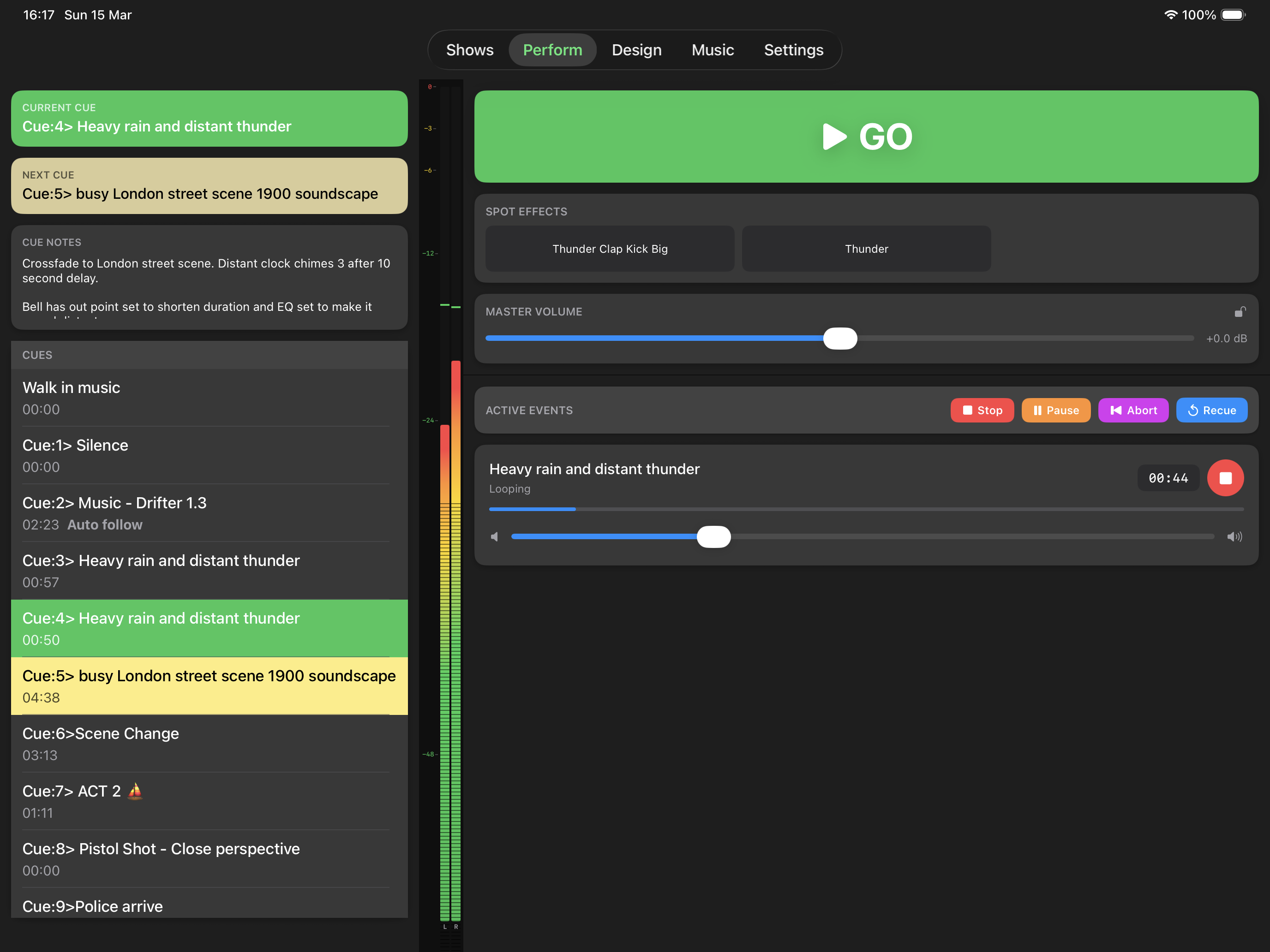
FX Live 3 Perform Screen

What Our Users Say

Rated ★★★★★ on the App Store by theatre companies and sound designers worldwide.

★★★★★

Excellent cue tool

“Our community theatre used the app for the first time and we absolutely love it. Thanks Driftwood.”

Interesting Theatre App Store Review
★★★★★

Many shows many cues zero problems

“This app is an amazing tool for all of us low budget folks who can’t afford cue lab. It’s also something I am able to program and edit even tho I am a tech challenged solo performer.”

Appalonia App Store Review
★★★★★

Great App for Amateurs

“I have used this for a number of years and every time I use it I find it so simple to add sound cues for our shows. I recommend it to everyone who wants to ensure their shows seem to be professionally created.”

Baxy 2019 App Store Review
★★★★★

Great App

“I’m a director of a small company doing fringe theatre etc. This app has been a godsend for us. Easy to use, operate, transportable, and efficient. Can’t recommend it enough!”

ianrbell App Store Review

Everything You Need for
Professional Sound Design

From cue design to live performance, FX Live 3 gives you complete control over every aspect of your sound.

🎛️

Cue-Based Design

Organise sound effects into numbered cues that match your script. Layer multiple audio effects, MIDI triggers, images, and video within a single cue.

▶️

Live Performance

A large GO button, real-time level meters, active event monitoring, and double-GO protection. Designed for reliability under pressure.

🎵

Audio Editing

Trim, fade, loop, and pan individual sound files. Set precise in/out points on a waveform timeline. Preview everything before showtime.

🎚️

EQ & DSP Effects

3-band parametric EQ, reverb, and echo on every effect. Make sounds feel like they're behind a wall, on a radio, or in a cathedral.

🎹

MIDI Control

Send and receive MIDI messages. Fire cues from a lighting desk, trigger lighting changes from your sound cue list, or sync with show controllers.

📺

Video & Image Output

Output images and video to an external display via HDMI or AirPlay. Perfect for projections, surtitles, and atmospheric backdrops.

🎶

Background Music

Independent music playlist for pre-show, interval, and post-show. Control music volume from your cue list. Up to 8 global spot effects.

📂

Show Management

Create, export, and share complete show archives with all audio files included. Multiple versions per show for rehearsal revisions.

See It in Action

A professional interface designed for the demands of live performance.

FX Live 3 Perform Screen

Perform Screen

The live performance interface with large GO button, real-time level meters, cue list, and active event monitoring. Designed for fast, reliable operation under pressure.

From Script to Stage in Minutes

FX Live 3 streamlines the entire sound design process.

1

Create Your Show

Open the Shows tab and create a new project for your production. FX Live saves everything as a portable .fxLive file.

2

Design Your Cues

Add numbered cues to match your script. Assign audio files, set trim points, adjust levels and panning, add fades and loops. Layer multiple effects per cue.

3

Add EQ & Effects

Shape each sound with 3-band parametric EQ. Add reverb for space and echo for depth. Make a studio recording sound like it's behind a door or inside a cathedral.

4

Run the Show

Switch to the Perform screen and tap GO to fire each cue in sequence. Enable Performance Mode for locked-down, distraction-free operation during the live show.

Free Demo, One Simple Upgrade

Download FX Live 3 free and explore every feature with the built-in demo show. When you're ready for production, a single purchase unlocks everything.

Free Demo

$0
  • Up to 6 cues per show
  • Full audio editing & preview
  • Live performance with GO button
  • Background music playlist
  • Demo show included
  • Try every feature before you buy

One Cue, Endless Possibilities

Combine different effect types within a single cue. Fire a door slam, a MIDI lighting change, and a video projection — all with one tap of GO.

🔊

Audio

Sound effects & atmospheres with full mixing control

🎶

Music

Advance the background music playlist

🎹

MIDI

Send MIDI messages to external equipment

🖼️

Image

Display stills on an external screen

🎬

Video

Play video clips on an external display

Black

Fade the external display to black

Technical Details

Supported Audio Formats

M4A MP3 WAV AIF AIFF

Supported Video Formats

M4V MP4 MOV

Supported Image Formats

PNG JPG JPEG

MIDI Connections

USB MIDI Network MIDI Bluetooth LE

External Display

USB-C / HDMI Lightning / HDMI AirPlay

Audio Import Sources

Files App AirDrop iTunes iCloud

Ready to Transform Your Live Sound?

Download FX Live 3 free and try every feature with the demo show. One purchase unlocks everything.

Download on the App Store

Available for iPad and Mac · Free demo · One purchase unlocks all features